> ## Documentation Index
> Fetch the complete documentation index at: https://docs-dev-fix-details-to-accordion-universal-components.mintlify.site/llms.txt
> Use this file to discover all available pages before exploring further.

> Learn how to configure an update policy form using Forms for Actions for users to review and accept new terms of service or consent updates.

# Use Cases: Configure an update policy form using Forms

<Card title="Before you start">
  1. Create a [Machine-to-Machine Application](/docs/get-started/auth0-overview/create-applications/machine-to-machine-apps) with the following scopes enabled:

  * `read:users`
  * `update:users`
  * `create:users`
  * `read:users_app_metadata`
  * `update:users_app_metadata`
  * `create:users_app_metadata`

  2. Add a [Vault connection](/docs/customize/forms/vault) using the M2M application credentials.
</Card>

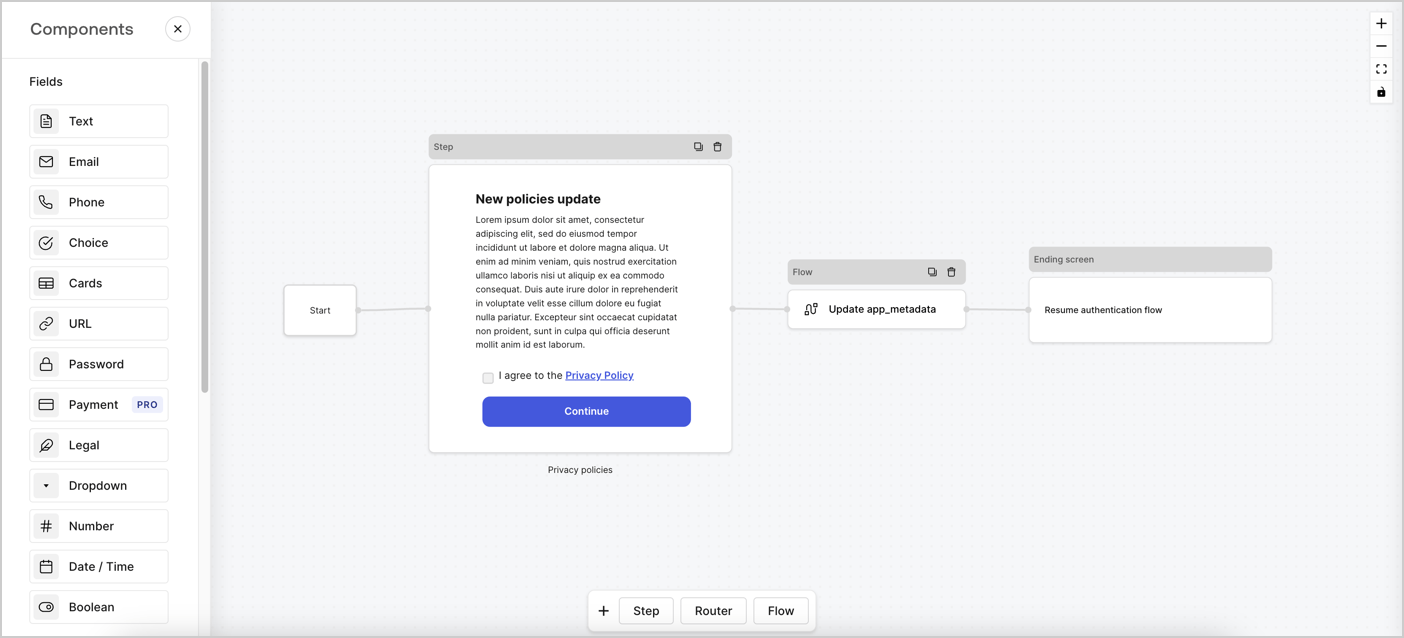
Forms for Actions allows you to create custom privacy policies flows and store the consent under the `app_metadata` object.
<Frame>
  <img src="https://mintcdn.com/docs-dev-fix-details-to-accordion-universal-components/8GJgmIFJNsKlnYig/docs/images/cdy7uua7fh8z/6i68dMvHDTijfRmSgN1x8Q/ad900e7d4c0fb34645921435472b8684/privavy-policy-form.png?fit=max&auto=format&n=8GJgmIFJNsKlnYig&q=85&s=4e4276cc7cdaed55263e7638e60436c2" alt="Dashboard > Actions > Forms > Privacy policy use case" data-og-width="1404" width="1404" data-og-height="638" height="638" data-path="docs/images/cdy7uua7fh8z/6i68dMvHDTijfRmSgN1x8Q/ad900e7d4c0fb34645921435472b8684/privavy-policy-form.png" data-optimize="true" data-opv="3" srcset="https://mintcdn.com/docs-dev-fix-details-to-accordion-universal-components/8GJgmIFJNsKlnYig/docs/images/cdy7uua7fh8z/6i68dMvHDTijfRmSgN1x8Q/ad900e7d4c0fb34645921435472b8684/privavy-policy-form.png?w=280&fit=max&auto=format&n=8GJgmIFJNsKlnYig&q=85&s=8619cf3e11d365f97f0e9a2e0c84afcb 280w, https://mintcdn.com/docs-dev-fix-details-to-accordion-universal-components/8GJgmIFJNsKlnYig/docs/images/cdy7uua7fh8z/6i68dMvHDTijfRmSgN1x8Q/ad900e7d4c0fb34645921435472b8684/privavy-policy-form.png?w=560&fit=max&auto=format&n=8GJgmIFJNsKlnYig&q=85&s=126f60a5263d99df60f51b28b7169fb0 560w, https://mintcdn.com/docs-dev-fix-details-to-accordion-universal-components/8GJgmIFJNsKlnYig/docs/images/cdy7uua7fh8z/6i68dMvHDTijfRmSgN1x8Q/ad900e7d4c0fb34645921435472b8684/privavy-policy-form.png?w=840&fit=max&auto=format&n=8GJgmIFJNsKlnYig&q=85&s=30c70bd51b439e4218a8876321cadb6b 840w, https://mintcdn.com/docs-dev-fix-details-to-accordion-universal-components/8GJgmIFJNsKlnYig/docs/images/cdy7uua7fh8z/6i68dMvHDTijfRmSgN1x8Q/ad900e7d4c0fb34645921435472b8684/privavy-policy-form.png?w=1100&fit=max&auto=format&n=8GJgmIFJNsKlnYig&q=85&s=cdad9eb199072ae721d33379371eeaea 1100w, https://mintcdn.com/docs-dev-fix-details-to-accordion-universal-components/8GJgmIFJNsKlnYig/docs/images/cdy7uua7fh8z/6i68dMvHDTijfRmSgN1x8Q/ad900e7d4c0fb34645921435472b8684/privavy-policy-form.png?w=1650&fit=max&auto=format&n=8GJgmIFJNsKlnYig&q=85&s=33fe436218626773999c6fad779f04b9 1650w, https://mintcdn.com/docs-dev-fix-details-to-accordion-universal-components/8GJgmIFJNsKlnYig/docs/images/cdy7uua7fh8z/6i68dMvHDTijfRmSgN1x8Q/ad900e7d4c0fb34645921435472b8684/privavy-policy-form.png?w=2500&fit=max&auto=format&n=8GJgmIFJNsKlnYig&q=85&s=5fd66bb5669b3e125bd1a59b89b306ba 2500w" />
</Frame>

The sections below outline how you can create an Update Policy form using nodes and flows, along with steps for adding your form to a [Post Login](/docs/customize/actions/explore-triggers/signup-and-login-triggers/login-trigger) Action.

## Create a form from scratch

Follow these steps to create a form to gather information:

1. Open the Form editor by selecting **Auth0 Dashboard > Actions > Forms.**
2. Select **Create Form** > **Start from scratch**.

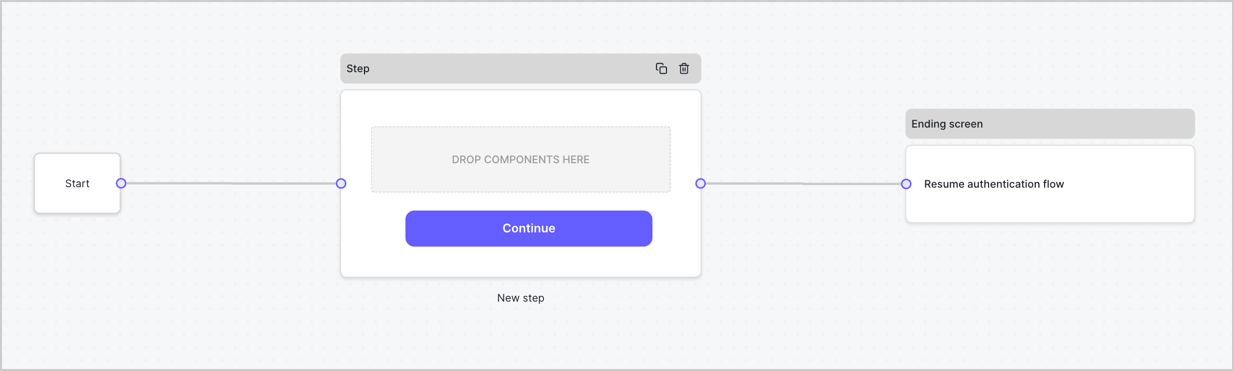
By default, a new form contains a Start node, a Step node, and an Ending screen node.
<Frame>
  <img src="https://mintcdn.com/docs-dev-fix-details-to-accordion-universal-components/VxHXvoklkBgH37_e/docs/images/cdy7uua7fh8z/2TZ9jSjgEcARFpULI6hz4R/a4319a1bd482f2ee5cc23100fdb2f42c/New-form-Forms-for-action-use-case.png?fit=max&auto=format&n=VxHXvoklkBgH37_e&q=85&s=1aadc28e55fc32fb32ab50a136ca33c6" alt="Dashboard > Forms > Use Cases > Form" data-og-width="1234" width="1234" data-og-height="371" height="371" data-path="docs/images/cdy7uua7fh8z/2TZ9jSjgEcARFpULI6hz4R/a4319a1bd482f2ee5cc23100fdb2f42c/New-form-Forms-for-action-use-case.png" data-optimize="true" data-opv="3" srcset="https://mintcdn.com/docs-dev-fix-details-to-accordion-universal-components/VxHXvoklkBgH37_e/docs/images/cdy7uua7fh8z/2TZ9jSjgEcARFpULI6hz4R/a4319a1bd482f2ee5cc23100fdb2f42c/New-form-Forms-for-action-use-case.png?w=280&fit=max&auto=format&n=VxHXvoklkBgH37_e&q=85&s=20e25834a65bf39de4ac19280fe3c386 280w, https://mintcdn.com/docs-dev-fix-details-to-accordion-universal-components/VxHXvoklkBgH37_e/docs/images/cdy7uua7fh8z/2TZ9jSjgEcARFpULI6hz4R/a4319a1bd482f2ee5cc23100fdb2f42c/New-form-Forms-for-action-use-case.png?w=560&fit=max&auto=format&n=VxHXvoklkBgH37_e&q=85&s=64987c32085d4ee9565cdac5cbf6055e 560w, https://mintcdn.com/docs-dev-fix-details-to-accordion-universal-components/VxHXvoklkBgH37_e/docs/images/cdy7uua7fh8z/2TZ9jSjgEcARFpULI6hz4R/a4319a1bd482f2ee5cc23100fdb2f42c/New-form-Forms-for-action-use-case.png?w=840&fit=max&auto=format&n=VxHXvoklkBgH37_e&q=85&s=afdb14add6a63a313bcf300ef931ccc0 840w, https://mintcdn.com/docs-dev-fix-details-to-accordion-universal-components/VxHXvoklkBgH37_e/docs/images/cdy7uua7fh8z/2TZ9jSjgEcARFpULI6hz4R/a4319a1bd482f2ee5cc23100fdb2f42c/New-form-Forms-for-action-use-case.png?w=1100&fit=max&auto=format&n=VxHXvoklkBgH37_e&q=85&s=d9ae97b192c220211d6b83b154788ab5 1100w, https://mintcdn.com/docs-dev-fix-details-to-accordion-universal-components/VxHXvoklkBgH37_e/docs/images/cdy7uua7fh8z/2TZ9jSjgEcARFpULI6hz4R/a4319a1bd482f2ee5cc23100fdb2f42c/New-form-Forms-for-action-use-case.png?w=1650&fit=max&auto=format&n=VxHXvoklkBgH37_e&q=85&s=bc2b079f557a0431bef83a4018e1658c 1650w, https://mintcdn.com/docs-dev-fix-details-to-accordion-universal-components/VxHXvoklkBgH37_e/docs/images/cdy7uua7fh8z/2TZ9jSjgEcARFpULI6hz4R/a4319a1bd482f2ee5cc23100fdb2f42c/New-form-Forms-for-action-use-case.png?w=2500&fit=max&auto=format&n=VxHXvoklkBgH37_e&q=85&s=4cd324a49cdfb7a28c603bfc8bdbc0a3 2500w" />
</Frame>

### Configure the Step node

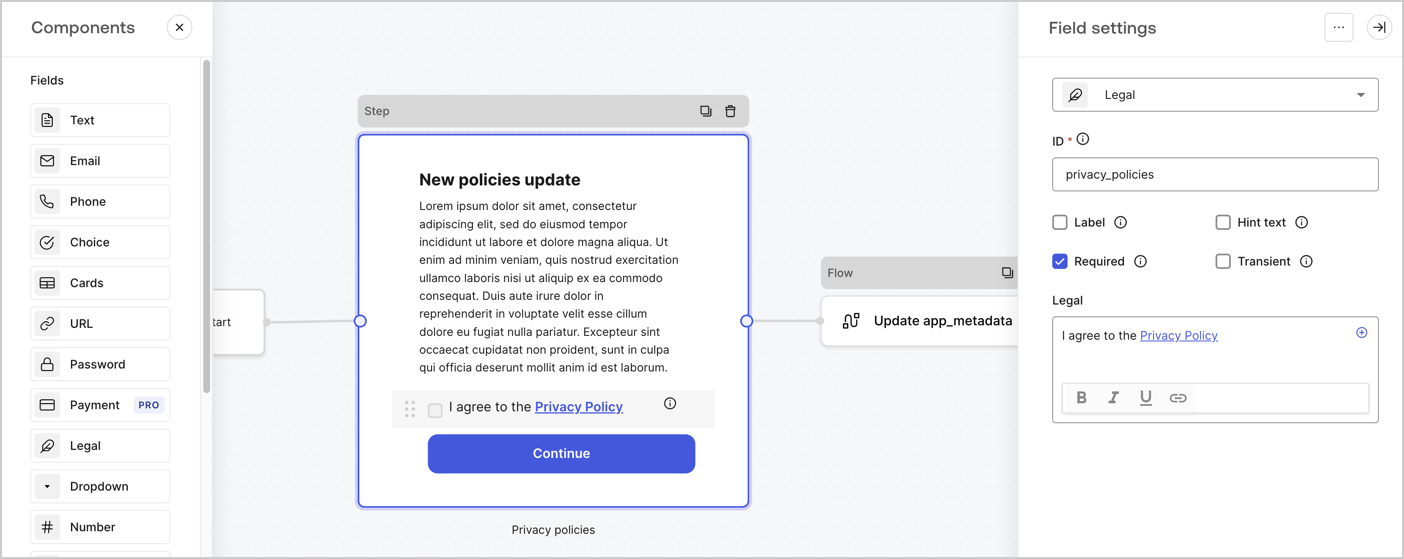
The Step node is the graphical interface visible to users. Add [Fields](/docs/customize/forms/nodes-and-components) to the Step node to collect the new agreement acceptance value by following these steps:

1. Drag a **Rich text** field from the **Components menu** into the **Step** node.

   * **Rich text**: Enter a description of your privacy policies updates.
   * Select **Save**.
2. Drag a **Legal** field into the **Step** node.

   * **ID**: Enter `privacy_policies`.
   * **Required**: Enable the checkbox.
   * **Legal**: Enter `I agree to the Privacy Policy`.
   * Select **Save**.
3. Select **Publish** to save.
<Frame>
  <img src="https://mintcdn.com/docs-dev-fix-details-to-accordion-universal-components/5LKKt0iKPaQ-m4ES/docs/images/cdy7uua7fh8z/59zFFjQjAnjogkc2QGIqqJ/0ad66b1b636544122aa4e65968b76c2c/privacy-policy-step-node.png?fit=max&auto=format&n=5LKKt0iKPaQ-m4ES&q=85&s=4623d34762b01c06297d206eac8a150a" alt="Dashboard > Actions > Forms > Use case privacy policy step node" data-og-width="1404" width="1404" data-og-height="559" height="559" data-path="docs/images/cdy7uua7fh8z/59zFFjQjAnjogkc2QGIqqJ/0ad66b1b636544122aa4e65968b76c2c/privacy-policy-step-node.png" data-optimize="true" data-opv="3" srcset="https://mintcdn.com/docs-dev-fix-details-to-accordion-universal-components/5LKKt0iKPaQ-m4ES/docs/images/cdy7uua7fh8z/59zFFjQjAnjogkc2QGIqqJ/0ad66b1b636544122aa4e65968b76c2c/privacy-policy-step-node.png?w=280&fit=max&auto=format&n=5LKKt0iKPaQ-m4ES&q=85&s=e29c25cc7e7116cc7fd622702979ea1c 280w, https://mintcdn.com/docs-dev-fix-details-to-accordion-universal-components/5LKKt0iKPaQ-m4ES/docs/images/cdy7uua7fh8z/59zFFjQjAnjogkc2QGIqqJ/0ad66b1b636544122aa4e65968b76c2c/privacy-policy-step-node.png?w=560&fit=max&auto=format&n=5LKKt0iKPaQ-m4ES&q=85&s=b612d4a3ae993bf0c1aba465047547b9 560w, https://mintcdn.com/docs-dev-fix-details-to-accordion-universal-components/5LKKt0iKPaQ-m4ES/docs/images/cdy7uua7fh8z/59zFFjQjAnjogkc2QGIqqJ/0ad66b1b636544122aa4e65968b76c2c/privacy-policy-step-node.png?w=840&fit=max&auto=format&n=5LKKt0iKPaQ-m4ES&q=85&s=0ab010b8b937e5c9b6bb582729bbf218 840w, https://mintcdn.com/docs-dev-fix-details-to-accordion-universal-components/5LKKt0iKPaQ-m4ES/docs/images/cdy7uua7fh8z/59zFFjQjAnjogkc2QGIqqJ/0ad66b1b636544122aa4e65968b76c2c/privacy-policy-step-node.png?w=1100&fit=max&auto=format&n=5LKKt0iKPaQ-m4ES&q=85&s=04f3633a4037e6fb5e8ff06b2c3a9920 1100w, https://mintcdn.com/docs-dev-fix-details-to-accordion-universal-components/5LKKt0iKPaQ-m4ES/docs/images/cdy7uua7fh8z/59zFFjQjAnjogkc2QGIqqJ/0ad66b1b636544122aa4e65968b76c2c/privacy-policy-step-node.png?w=1650&fit=max&auto=format&n=5LKKt0iKPaQ-m4ES&q=85&s=1045edf1a4ea5f3942995070ac00172b 1650w, https://mintcdn.com/docs-dev-fix-details-to-accordion-universal-components/5LKKt0iKPaQ-m4ES/docs/images/cdy7uua7fh8z/59zFFjQjAnjogkc2QGIqqJ/0ad66b1b636544122aa4e65968b76c2c/privacy-policy-step-node.png?w=2500&fit=max&auto=format&n=5LKKt0iKPaQ-m4ES&q=85&s=3d63ac9461274fc2c05660b5e10b45fa 2500w" />
</Frame>

### Configure the Flow node

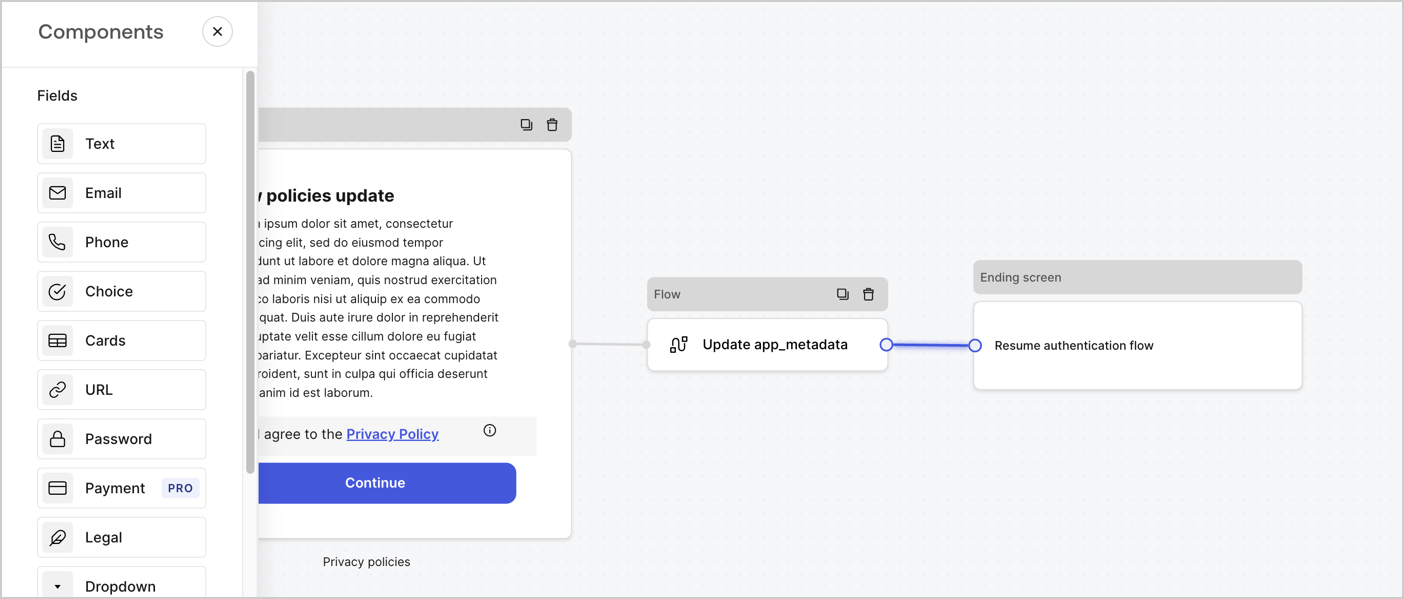
Add a **Flow** node after the **Step** node to update the `app_metadata` and resume the authentication flow by following these steps:

1. Select **Flow** from the bottom of the Form editor.
2. Remove the existing link between the **Step** and **Ending Screen** nodes.
3. Select the new **Flow** > **Click to add a flow** > **Create a new flow.**

   * Enter `Update app_metadata` in the **Name** field.
   * Select **Create**.
   * Select **Save**.
4. Link the **Flow** node to the **Step** and **Ending Screen** nodes as pictured below.
5. Select **Publish** to save.
<Frame>
  <img src="https://mintcdn.com/docs-dev-fix-details-to-accordion-universal-components/8GJgmIFJNsKlnYig/docs/images/cdy7uua7fh8z/6YIkzm7SrpM9LW76AXuRzh/353c518fe82bbaa440836da1d83596d6/link-policies.png?fit=max&auto=format&n=8GJgmIFJNsKlnYig&q=85&s=3884d8ccd7b77c39ec804fb474fa5747" alt="Dashboard > Actions > Forms > Form" data-og-width="1404" width="1404" data-og-height="599" height="599" data-path="docs/images/cdy7uua7fh8z/6YIkzm7SrpM9LW76AXuRzh/353c518fe82bbaa440836da1d83596d6/link-policies.png" data-optimize="true" data-opv="3" srcset="https://mintcdn.com/docs-dev-fix-details-to-accordion-universal-components/8GJgmIFJNsKlnYig/docs/images/cdy7uua7fh8z/6YIkzm7SrpM9LW76AXuRzh/353c518fe82bbaa440836da1d83596d6/link-policies.png?w=280&fit=max&auto=format&n=8GJgmIFJNsKlnYig&q=85&s=d30d2dc91b81297c60a5a2f6751b7ab9 280w, https://mintcdn.com/docs-dev-fix-details-to-accordion-universal-components/8GJgmIFJNsKlnYig/docs/images/cdy7uua7fh8z/6YIkzm7SrpM9LW76AXuRzh/353c518fe82bbaa440836da1d83596d6/link-policies.png?w=560&fit=max&auto=format&n=8GJgmIFJNsKlnYig&q=85&s=2711282d89a0b37f8543ea5f101234b9 560w, https://mintcdn.com/docs-dev-fix-details-to-accordion-universal-components/8GJgmIFJNsKlnYig/docs/images/cdy7uua7fh8z/6YIkzm7SrpM9LW76AXuRzh/353c518fe82bbaa440836da1d83596d6/link-policies.png?w=840&fit=max&auto=format&n=8GJgmIFJNsKlnYig&q=85&s=773c3cd4c984d7bd6b22c7792c7ba637 840w, https://mintcdn.com/docs-dev-fix-details-to-accordion-universal-components/8GJgmIFJNsKlnYig/docs/images/cdy7uua7fh8z/6YIkzm7SrpM9LW76AXuRzh/353c518fe82bbaa440836da1d83596d6/link-policies.png?w=1100&fit=max&auto=format&n=8GJgmIFJNsKlnYig&q=85&s=72222ff3e2b444da846ddfed2ec31fa8 1100w, https://mintcdn.com/docs-dev-fix-details-to-accordion-universal-components/8GJgmIFJNsKlnYig/docs/images/cdy7uua7fh8z/6YIkzm7SrpM9LW76AXuRzh/353c518fe82bbaa440836da1d83596d6/link-policies.png?w=1650&fit=max&auto=format&n=8GJgmIFJNsKlnYig&q=85&s=8d497a10187bf359d98a05e85b4679f8 1650w, https://mintcdn.com/docs-dev-fix-details-to-accordion-universal-components/8GJgmIFJNsKlnYig/docs/images/cdy7uua7fh8z/6YIkzm7SrpM9LW76AXuRzh/353c518fe82bbaa440836da1d83596d6/link-policies.png?w=2500&fit=max&auto=format&n=8GJgmIFJNsKlnYig&q=85&s=b3ded112b70ca62c9ac0c1b215e39b6b 2500w" />
</Frame>

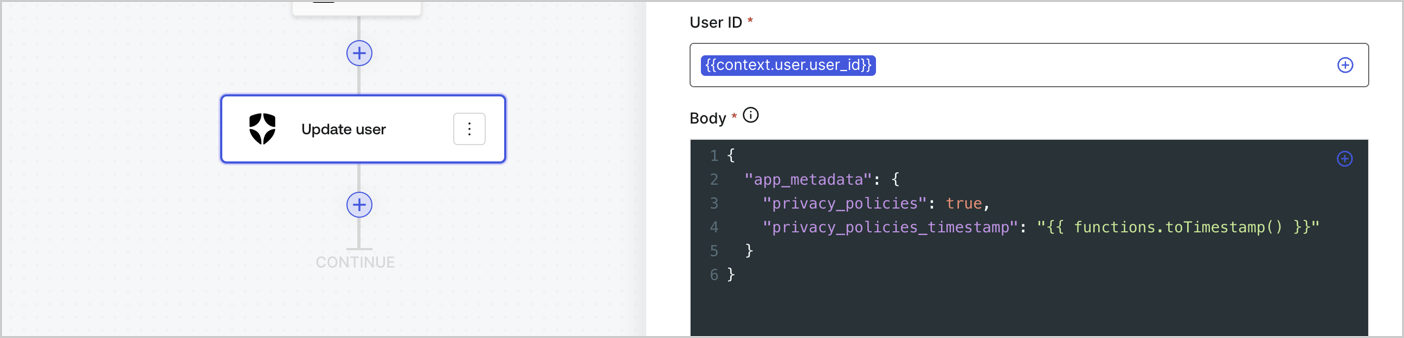
Add an Auth0 Update user action to the flow by following these steps:

1. Select the **Flow** **Update app\_metadata** > **Edit flow** to open the Flow editor in a new tab.
2. Below the StartAction, select the **+** icon to add an **Update user** action. Complete the fields below, then select **Save** to continue.

   * **Connection**: Select from the dropdown the Vault connection to your M2M application.

   * **User ID**: Enter `{{context.user.user_id}}`.

   * **Body**: Copy and paste the following code to update the app\_metadata with the privacy\_policies and privacy\_policies\_timestamp properties.

     ```text lines theme={null}
     {
       "app_metadata": {
         "privacy_policies": true,
         "privacy_policies_timestamp": "{{ functions.toTimestamp() }}"
       }
     }
     ```

   * Select **Save**.
3. Select **Publish** to save.
<Frame>
  <img src="https://mintcdn.com/docs-dev-fix-details-to-accordion-universal-components/E7m_k3rSph1mVsxx/docs/images/cdy7uua7fh8z/CvMNIwWrOUwaFW4X3G28p/1fb70ae57a20749d9ffaaba8dc0b7e26/update-user-privacy.png?fit=max&auto=format&n=E7m_k3rSph1mVsxx&q=85&s=24fce9438e358a66af1d367e62f662cd" alt="Dashboard > Actions > Forms > User case privacy policy code" data-og-width="1404" width="1404" data-og-height="338" height="338" data-path="docs/images/cdy7uua7fh8z/CvMNIwWrOUwaFW4X3G28p/1fb70ae57a20749d9ffaaba8dc0b7e26/update-user-privacy.png" data-optimize="true" data-opv="3" srcset="https://mintcdn.com/docs-dev-fix-details-to-accordion-universal-components/E7m_k3rSph1mVsxx/docs/images/cdy7uua7fh8z/CvMNIwWrOUwaFW4X3G28p/1fb70ae57a20749d9ffaaba8dc0b7e26/update-user-privacy.png?w=280&fit=max&auto=format&n=E7m_k3rSph1mVsxx&q=85&s=5241732c26dd57839fc435e7e4a4e20c 280w, https://mintcdn.com/docs-dev-fix-details-to-accordion-universal-components/E7m_k3rSph1mVsxx/docs/images/cdy7uua7fh8z/CvMNIwWrOUwaFW4X3G28p/1fb70ae57a20749d9ffaaba8dc0b7e26/update-user-privacy.png?w=560&fit=max&auto=format&n=E7m_k3rSph1mVsxx&q=85&s=b589c92b783adaba8bdfbd04f19594ff 560w, https://mintcdn.com/docs-dev-fix-details-to-accordion-universal-components/E7m_k3rSph1mVsxx/docs/images/cdy7uua7fh8z/CvMNIwWrOUwaFW4X3G28p/1fb70ae57a20749d9ffaaba8dc0b7e26/update-user-privacy.png?w=840&fit=max&auto=format&n=E7m_k3rSph1mVsxx&q=85&s=bfef178092f7212b55defb7b7e304622 840w, https://mintcdn.com/docs-dev-fix-details-to-accordion-universal-components/E7m_k3rSph1mVsxx/docs/images/cdy7uua7fh8z/CvMNIwWrOUwaFW4X3G28p/1fb70ae57a20749d9ffaaba8dc0b7e26/update-user-privacy.png?w=1100&fit=max&auto=format&n=E7m_k3rSph1mVsxx&q=85&s=c8504dfb8314b6ed1383378b109c2932 1100w, https://mintcdn.com/docs-dev-fix-details-to-accordion-universal-components/E7m_k3rSph1mVsxx/docs/images/cdy7uua7fh8z/CvMNIwWrOUwaFW4X3G28p/1fb70ae57a20749d9ffaaba8dc0b7e26/update-user-privacy.png?w=1650&fit=max&auto=format&n=E7m_k3rSph1mVsxx&q=85&s=40eddbb2047378caa90ca20b32324c45 1650w, https://mintcdn.com/docs-dev-fix-details-to-accordion-universal-components/E7m_k3rSph1mVsxx/docs/images/cdy7uua7fh8z/CvMNIwWrOUwaFW4X3G28p/1fb70ae57a20749d9ffaaba8dc0b7e26/update-user-privacy.png?w=2500&fit=max&auto=format&n=E7m_k3rSph1mVsxx&q=85&s=fbe848a19bf0ddf0e5362fb5d45a2c05 2500w" />
</Frame>

<Callout icon="file-lines" color="#0EA5E9" iconType="regular">
  The flow **Update app\_metadata** adds a `privacy_policies true` value to the app`_metadata` object and also generates a timestamp with a [helper function.](/docs/customize/forms/variables)
</Callout>

## Retrieve the form render code

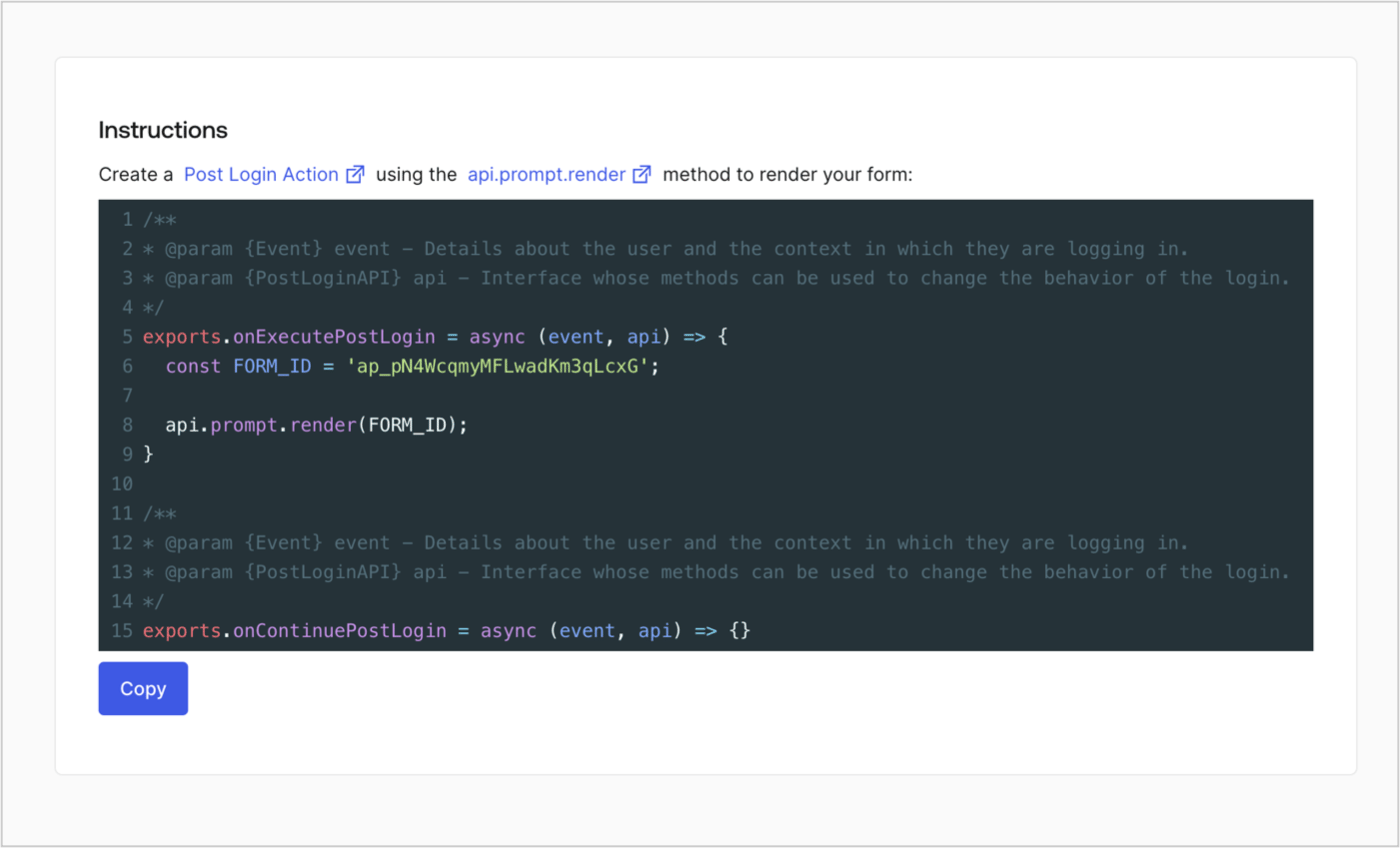
Retrieve your form render code to visually render the form with a custom Post Login Action by following these steps:

* From the Form editor, select **`<> Render`**.
* Select **Copy**.
<Frame>
  <img src="https://mintcdn.com/docs-dev-fix-details-to-accordion-universal-components/jHBXk6QfX_R2PDPL/docs/images/cdy7uua7fh8z/2EIUzc539sq9lwoTKbjoJv/496a864c0fc44a782c9cadca119dbfb0/embed.png?fit=max&auto=format&n=jHBXk6QfX_R2PDPL&q=85&s=ee1c143e59aae6940456191dd8059e79" alt="Dashboard > Actions > Forms > Form > Embed" data-og-width="1400" width="1400" data-og-height="848" height="848" data-path="docs/images/cdy7uua7fh8z/2EIUzc539sq9lwoTKbjoJv/496a864c0fc44a782c9cadca119dbfb0/embed.png" data-optimize="true" data-opv="3" srcset="https://mintcdn.com/docs-dev-fix-details-to-accordion-universal-components/jHBXk6QfX_R2PDPL/docs/images/cdy7uua7fh8z/2EIUzc539sq9lwoTKbjoJv/496a864c0fc44a782c9cadca119dbfb0/embed.png?w=280&fit=max&auto=format&n=jHBXk6QfX_R2PDPL&q=85&s=cef7da2ae4a83107ef10f1ffb83baf0e 280w, https://mintcdn.com/docs-dev-fix-details-to-accordion-universal-components/jHBXk6QfX_R2PDPL/docs/images/cdy7uua7fh8z/2EIUzc539sq9lwoTKbjoJv/496a864c0fc44a782c9cadca119dbfb0/embed.png?w=560&fit=max&auto=format&n=jHBXk6QfX_R2PDPL&q=85&s=338f77b97a0ff6f06837e604194361d1 560w, https://mintcdn.com/docs-dev-fix-details-to-accordion-universal-components/jHBXk6QfX_R2PDPL/docs/images/cdy7uua7fh8z/2EIUzc539sq9lwoTKbjoJv/496a864c0fc44a782c9cadca119dbfb0/embed.png?w=840&fit=max&auto=format&n=jHBXk6QfX_R2PDPL&q=85&s=0f0e4888559a1b1cae340bf8722ed351 840w, https://mintcdn.com/docs-dev-fix-details-to-accordion-universal-components/jHBXk6QfX_R2PDPL/docs/images/cdy7uua7fh8z/2EIUzc539sq9lwoTKbjoJv/496a864c0fc44a782c9cadca119dbfb0/embed.png?w=1100&fit=max&auto=format&n=jHBXk6QfX_R2PDPL&q=85&s=85ec988afd082cbf9091d4eb21808563 1100w, https://mintcdn.com/docs-dev-fix-details-to-accordion-universal-components/jHBXk6QfX_R2PDPL/docs/images/cdy7uua7fh8z/2EIUzc539sq9lwoTKbjoJv/496a864c0fc44a782c9cadca119dbfb0/embed.png?w=1650&fit=max&auto=format&n=jHBXk6QfX_R2PDPL&q=85&s=0caae8c630fe15765c284f9ecf25ee96 1650w, https://mintcdn.com/docs-dev-fix-details-to-accordion-universal-components/jHBXk6QfX_R2PDPL/docs/images/cdy7uua7fh8z/2EIUzc539sq9lwoTKbjoJv/496a864c0fc44a782c9cadca119dbfb0/embed.png?w=2500&fit=max&auto=format&n=jHBXk6QfX_R2PDPL&q=85&s=92572a4c53b641f4ce4cede391c074b6 2500w" />
</Frame>

## Create a Post Login Action

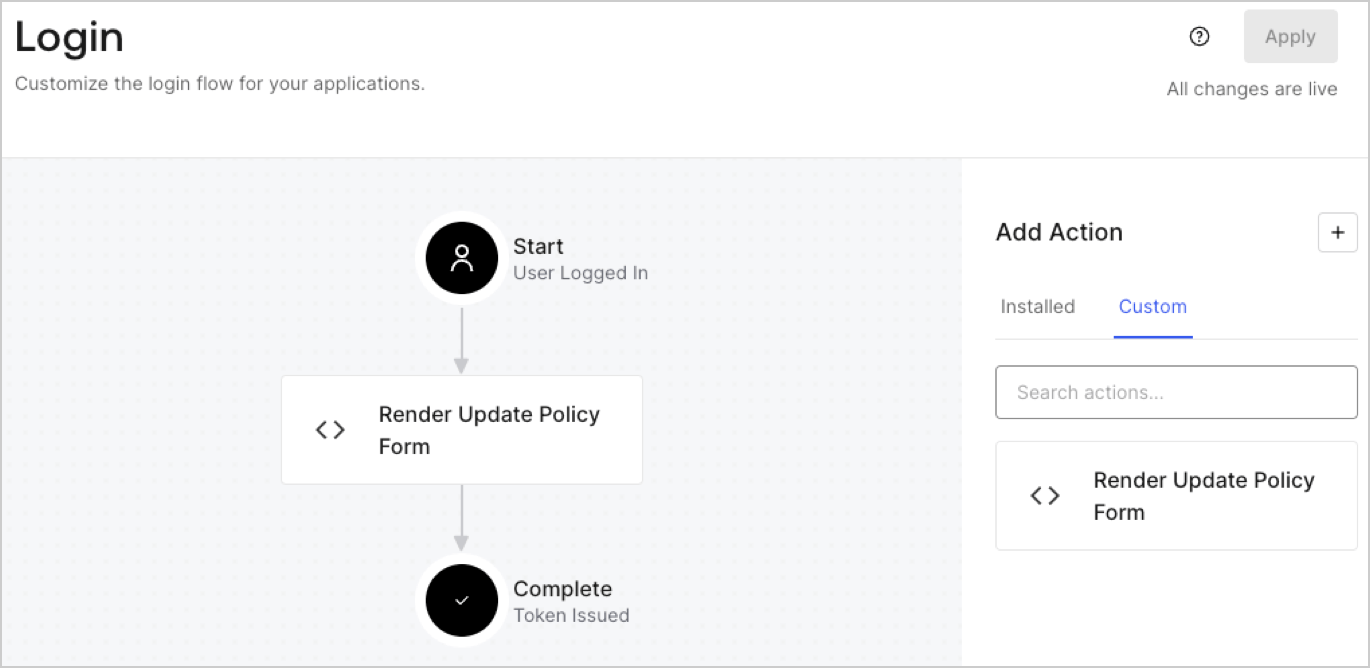
Create a post-login Action to render your form by following these steps:

1. Navigate to **Auth0 Dashboard > Actions > Flows > Login.**
2. Select the **+** icon and Select **Build from scratch**:

   * **Name**: Enter `Render Update Policy Form`.
   * **Trigger**: Select `Login / Post Login`.
   * **Runtime**: Select the recommended version.
3. Select **Create**.

To configure the post-login Action:

1. Delete the existing code from the Code editor.
2. Paste the form render code into the Code editor.
3. Edit the code to define the conditional logic that will render the form.

   ```javascript lines theme={null}
   /**
   * @param {Event} event - Details about the user and the context in which they are logging in.
   * @param {PostLoginAPI} api - Interface whose methods can be used to change the behavior of the login.
   */
   exports.onExecutePostLogin = async (event, api) => {
     const FORM_ID = 'REPLACE_WITH_YOUR_FORM_ID';

     if (event.user.app_metadata.privacy_policies !== true) {
       api.prompt.render(FORM_ID);
     }
   }

   exports.onContinuePostLogin = async (event, api) => { }
   ```

   <Callout icon="file-lines" color="#0EA5E9" iconType="regular">
     The example code above will render the form when a user is missing the app metadata `privacy_policies` property.
   </Callout>
4. Select **Deploy.**
5. Drag and Drop the **Render Update Policy Form** Action to the **Login** flow.
   <Frame>
     <img src="https://mintcdn.com/docs-dev-fix-details-to-accordion-universal-components/-D_g6lT7zm69Dc-T/docs/images/cdy7uua7fh8z/5TOwDgevZsBqd7yZynUYWU/41ca909dc3007aed4f40ff794a05efa5/postlogin.png?fit=max&auto=format&n=-D_g6lT7zm69Dc-T&q=85&s=471760904d9eaea2f4f377ec43ea35b6" alt="Dashboard > Forms > Use Case > Render update policy form login action" data-og-width="1370" width="1370" data-og-height="668" height="668" data-path="docs/images/cdy7uua7fh8z/5TOwDgevZsBqd7yZynUYWU/41ca909dc3007aed4f40ff794a05efa5/postlogin.png" data-optimize="true" data-opv="3" srcset="https://mintcdn.com/docs-dev-fix-details-to-accordion-universal-components/-D_g6lT7zm69Dc-T/docs/images/cdy7uua7fh8z/5TOwDgevZsBqd7yZynUYWU/41ca909dc3007aed4f40ff794a05efa5/postlogin.png?w=280&fit=max&auto=format&n=-D_g6lT7zm69Dc-T&q=85&s=78d7465e9241bbf2211b79e7f2d04db7 280w, https://mintcdn.com/docs-dev-fix-details-to-accordion-universal-components/-D_g6lT7zm69Dc-T/docs/images/cdy7uua7fh8z/5TOwDgevZsBqd7yZynUYWU/41ca909dc3007aed4f40ff794a05efa5/postlogin.png?w=560&fit=max&auto=format&n=-D_g6lT7zm69Dc-T&q=85&s=0d88378058fe270d4b2cfd09c1110554 560w, https://mintcdn.com/docs-dev-fix-details-to-accordion-universal-components/-D_g6lT7zm69Dc-T/docs/images/cdy7uua7fh8z/5TOwDgevZsBqd7yZynUYWU/41ca909dc3007aed4f40ff794a05efa5/postlogin.png?w=840&fit=max&auto=format&n=-D_g6lT7zm69Dc-T&q=85&s=7e50eb859164d4aafa6234a981a9e572 840w, https://mintcdn.com/docs-dev-fix-details-to-accordion-universal-components/-D_g6lT7zm69Dc-T/docs/images/cdy7uua7fh8z/5TOwDgevZsBqd7yZynUYWU/41ca909dc3007aed4f40ff794a05efa5/postlogin.png?w=1100&fit=max&auto=format&n=-D_g6lT7zm69Dc-T&q=85&s=2305425326a86f03ab6c0cd72cd0fa51 1100w, https://mintcdn.com/docs-dev-fix-details-to-accordion-universal-components/-D_g6lT7zm69Dc-T/docs/images/cdy7uua7fh8z/5TOwDgevZsBqd7yZynUYWU/41ca909dc3007aed4f40ff794a05efa5/postlogin.png?w=1650&fit=max&auto=format&n=-D_g6lT7zm69Dc-T&q=85&s=6556a146b90a0fdb5616a0922caf8c4c 1650w, https://mintcdn.com/docs-dev-fix-details-to-accordion-universal-components/-D_g6lT7zm69Dc-T/docs/images/cdy7uua7fh8z/5TOwDgevZsBqd7yZynUYWU/41ca909dc3007aed4f40ff794a05efa5/postlogin.png?w=2500&fit=max&auto=format&n=-D_g6lT7zm69Dc-T&q=85&s=0432ded6abcca5180c4882fcbee1630a 2500w" />
   </Frame>
6. Select **Apply.**

### Test implementation

Test the implementation by following these steps:

1. Log in with an existing user whose app`_metadata` attribute `privacy_policies` does not have a value.
2. The post-login Action in the Login flow will render the form and prompt for acceptance.
3. Select **Auth0 Dashboard > User Management > Users,** locate the user and verify that the `app_metadata` attribute `privacy_policies` contains a `true` value and a timestamp.
